
Apple just dropped reviews for its latest trio of smartwatches—the Apple Watch SE 3, Series 11, and Ultra 3—and yes, I’ve been strapping all three onto my arms in an attempt to figure out whether they’re worth your money. The only problem? I only have two wrists, and there are three watches. So, until Apple invents an ankle version, I’m juggling them as best as I can while collecting the health data I need before giving you my final verdict.
If you’ve already been doomscrolling through reviews and wondering whether you should actually buy one of these shiny new wrist computers when they officially land in stores this Friday, September 19, let me help break things down.
What’s New This Year?
As I said in my hands-on coverage from last week’s “Awe Jawdropping” event, these new Apple Watches are more refinement than revolution. All three models—SE 3, Series 11, and Ultra 3—share some core upgrades:
- GPS-only or GPS + Cellular options
- 5G connectivity (on cellular models)
- The new S10 chipset for better performance
- 64GB of internal storage
Think of them as Apple offering a “good, better, best” lineup, each appealing to slightly different types of users.
- Apple Watch SE 3 ($250): The budget-friendly option. Perfect if you just want excellent health/fitness tracking, an always-on display, and you don’t need every shiny new feature. Battery life: ~18 hours.
- Apple Watch Series 11: The middle child with perks like larger/brighter displays, a thinner design, ECG, blood oxygen monitoring (via iPhone), and a better optical heart sensor for more accurate tracking. It even comes in titanium finishes. Battery life: ~24 hours.
- Apple Watch Ultra 3: The “beast mode” model. Everything the Series 11 has, plus the biggest display, satellite connectivity for emergencies, and the best battery life Apple has ever offered—up to 42 hours.
Straightforward enough, right? But here’s the real question: should you upgrade if you already own an Apple Watch?
The Upgrade Question
The obvious draw is battery life. If you’ve been wearing your Apple Watch daily for workouts, your current battery has probably started feeling weaker. Apple Watch batteries don’t age gracefully—eventually, they degrade. But beyond battery gains, the two big features that might tempt you this year are Hypertension Notifications and Sleep Score.
Hypertension Notifications
Hypertension (a.k.a. high blood pressure) is often called the “silent killer” because symptoms rarely show until it’s dangerous. With FDA clearance, the Series 11 and Ultra 3 can passively monitor your heart data and flag patterns linked to hypertension. Apple says the feature uses a machine-learning algorithm trained on data from over 100,000 people. Importantly, it’s not actually measuring your blood pressure, but identifying patterns that could indicate risk.
The feature runs in the background, analyzing 30-day chunks of your heart data. If you’re 22 or older, not pregnant, and wearing your watch consistently, it could alert you before you even know there’s an issue. That kind of early warning system could literally save your life.
Sleep Score
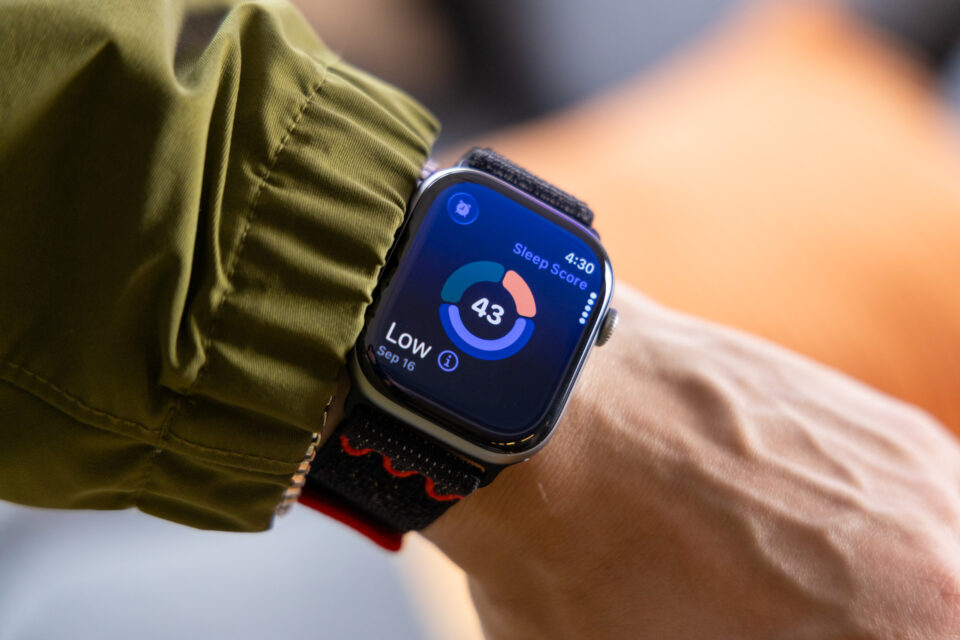
This one’s a “finally” moment. Competing wearables have had solid sleep tracking for years, but Apple was lagging. Sleep Score, available across all three new models, condenses your sleep into three metrics—duration, bedtime, and interruptions—and visualizes them in a donut-style ring. At the end, you get a numerical score and a rating from very low to excellent.
It’s part data tool, part guilt trip—gamifying sleep so you feel pressured to get a better score next night. As someone who has been battling insomnia, I can confirm it’s both helpful and a little shaming. But for anyone who’s serious about improving their rest, it’s a welcome upgrade.
The Good News for Current Owners
Here’s the kicker: you may not need to buy a new watch to get these features. With watchOS 26:
- Sleep Score comes to all new Apple Watches, including the SE 3.
- Hypertension Notifications are also available on Series 9 and later, plus the Ultra 2.
So if you already own one of those models, you can access the headline features without spending another $250–$800.
So, Should You Upgrade?
If you’re clinging to a Series 6, SE 2, or Ultra 1, and your battery is still decent, you can probably skip this generation and still enjoy Sleep Score for free. If you’re on a Series 9 or Ultra 2, you even get the new hypertension alerts. But if your watch is older—or your battery feels like it’s wheezing through the day—this year’s lineup could be worth the jump, especially if life-saving health features matter to you.
In the end, the Apple Watch SE 3, Series 11, and Ultra 3 aren’t groundbreaking, but they refine the formula in ways that might matter depending on what you need. For some, the upgrade will be essential. For others, it’s a reminder that sometimes the smartest choice is to just install the software update and keep wearing the watch you already own.